
Observability explained
When production misbehaves, “the server is down” is not enough—you need to know which dependency failed, for whom, and since when. Observability is the practice of instrumenting systems so you can answer novel questions from external signals: metrics, logs, and traces, grounded in SLOs that reflect user experience.
Helpful background: Kubernetes debugging (kubectl triage) and DevSec Core (deploy gates that can consult health signals).
After reading, you should be able to:
- Distinguish monitoring from observability and name the three pillars.
- Use RED and USE methods to pick the right metrics.
- Define SLI, SLO, and error budget in plain language.
- Correlate logs and traces with a shared
trace_id/request_id. - Place observability in the path from deploy → prod → on-call.
Step 1 — Monitoring vs observability
| Monitoring | Observability |
|---|---|
| Known failure modes, predefined dashboards and alerts | Explore unknowns—“why is checkout slow only in EU?” |
| “Is CPU high?” | “Which span in the payment service added 800ms?” |
| Threshold alerts on metrics you already chart | High-cardinality dimensions (user tier, region, feature flag) |
You need both: monitoring catches regressions quickly; observability tooling lets engineers debug without shipping new printf statements.
Step 2 — The three pillars
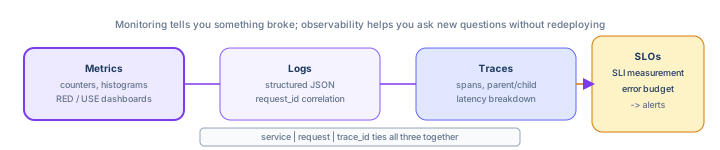
Metrics
Numeric time series—cheap to aggregate, ideal for dashboards and alerting.
- Counter — only goes up (
http_requests_total). - Gauge — up or down (
queue_depth,memory_bytes). - Histogram — distribution of values (latency percentiles).
Logs
Discrete events with context—best for “what happened to order 9182?” Prefer structured JSON over grep-friendly plain text in production.
Traces
End-to-end request paths across services—each span is one unit of work (HTTP handler, DB query). Traces explain latency composition.
Step 3 — Golden signals (Google SRE)
For user-facing services, chart these four:
- Latency — time to serve a request (distinguish success vs error latency).
- Traffic — demand (requests/sec, messages/sec).
- Errors — rate of failed requests (HTTP 5xx, exceptions).
- Saturation — how “full” the service is (CPU, memory, thread pool queue).
Maps cleanly to the RED method for services: Rate, Errors, Duration. For nodes and datastores use USE: Utilization, Saturation, Errors.
Step 4 — SLI, SLO, error budget
| Term | Definition | Example |
|---|---|---|
| SLI (indicator) | Measurable aspect of reliability | “Ratio of successful HTTP requests < 500ms” |
| SLO (objective) | Target for an SLI over a window | “99.9% of requests succeed in 30 days” |
| SLA (agreement) | Contract with customers (legal/financial) | “99.95% uptime or credits” |
| Error budget | Allowed unreliability before SLO breach | 0.1% of 30 days ≈ 43 minutes downtime |
availability_sli = successful_requests / total_requests
slo_target         = 0.999   # 99.9% over 30d rolling window
error_budget_left  = 1 - slo_target - (failures so far in window)
When the budget is exhausted, freeze risky releases and focus on reliability—product and engineering align on tradeoffs.
Step 5 — One request, three signals (correlation)
Generate a trace_id at the edge (ingress / API gateway) and propagate it:
{
  "level": "info",
  "msg": "payment captured",
  "trace_id": "4bf92f3577b34da6a3ce929d0e0e4736",
  "request_id": "req_8f2a",
  "order_id": "ord_9182",
  "duration_ms": 142
}
HTTP header convention: traceparent (W3C Trace Context) or X-Request-Id. In Kubernetes, sidecars or the app SDK attach the same ID to metrics labels where cardinality allows.
Step 6 — Where observability sits in the platform
Developer → CI build/test → deploy to K8s → metrics/logs/traces export
                                      ↓
                              Prometheus / Loki / Tempo (or vendor)
                                      ↓
Grafana dashboards + alert routes → PagerDuty/Slack- CI/CD — smoke tests after deploy; optional “canary SLO” gate before full promotion (environment gates).
- Kubernetes — cAdvisor/node metrics, pod logs, liveness vs SLO (a passing probe ≠ happy users).
- Infrastructure — cloud metrics (ALB 5xx, RDS CPU) complement app signals (platform layer).
Step 7 — Cardinality and cost
Every unique label combination is a new time series. Safe labels: service, route, status_class (2xx/5xx). Risky labels: user_id, email—explodes storage and leaks PII.
Rule of thumb: If a label has more than ~10–50 values in steady state, do not use it on high-frequency metrics—log or trace it instead.
Step 8 — Alerting philosophy
Page humans for symptoms (SLO burn, user-visible errors), not every cause (CPU 70%). Good alert:
- Actionable — someone knows the first debugging step.
- Linked — dashboard + runbook URL in the notification.
- Rare — if it fires weekly and is ignored, delete or fix the threshold.
Burn-rate alerts (multi-window) detect fast budget consumption without noisy single-threshold pages—covered in the SLO guide coming next on this track.
Step 9 — Tool landscape (pick one stack)
| Concern | Open-source stack | Managed examples |
|---|---|---|
| Metrics | Prometheus + Grafana | Datadog, CloudWatch, Azure Monitor |
| Logs | Loki, OpenSearch | Splunk, Datadog Logs |
| Traces | Tempo, Jaeger (OTel collector) | Honeycomb, Datadog APM |
| Instrumentation | OpenTelemetry SDK | Vendor agents |
OpenTelemetry is the neutral API—export to whichever backend your org standardizes on.
Step 10 — Anti-patterns
- Alerting on
CPU > 80%without tying to user pain. - Unstructured logs you cannot query in an incident.
- No trace propagation across async queues or internal RPCs.
- SLOs written but never measured—dashboard fiction.
- On-call runbooks that say “check the logs” with no link or query.
Step 11 — What to learn next on this track
- Metrics & Prometheus — instrumentation, scrape configs, PromQL, recording rules, RED dashboards.
- Logs & centralized logging — JSON schema, Promtail, Loki, LogQL, retention, K8s collection.
- Distributed tracing — OpenTelemetry, OTLP, Tempo, traceparent propagation, sampling.
- SLOs, alerting & on-call — burn-rate alerts, Alertmanager, runbooks, error-budget deploy gates.
Interview phrase: “We instrument RED metrics per service, structured logs with trace_id, distributed tracing on critical paths, and SLOs with error budgets—alerts page on symptom-based burn rates, and deploy gates respect remaining budget.”
The one line to remember
Observability is metrics + logs + traces tied together by request context, judged against SLOs—so on-call answers “what broke for customers?” not “is a graph green?”