
Logs & centralized logging
kubectl logs is enough for one pod—for production you need every replica in one searchable place.
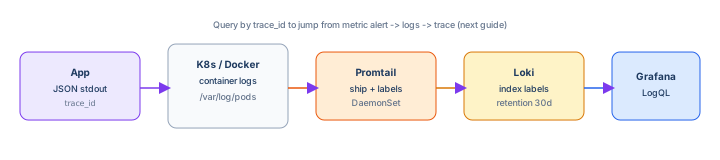
This guide implements structured JSON logs, ships them with Promtail → Loki,
queries with LogQL, and ties lines to trace_id so a
Prometheus alert becomes a filtered log view in seconds.
Prerequisites: Observability explained and a service that logs to stdout (container-friendly).
After reading, you should be able to:
- Emit one JSON object per log line with stable field names.
- Run a local Loki stack and query logs in Grafana.
- Collect logs from Kubernetes with Promtail labels.
- Correlate logs to requests via
trace_id. - Set retention and avoid logging secrets or unbounded cardinality.
Step 1 — Structured log schema
Pick a small, consistent set of fields. Every line should parse as JSON:
{
  "timestamp": "2026-06-05T14:22:01.123Z",
  "level": "info",
  "service": "checkout-api",
  "msg": "payment captured",
  "trace_id": "4bf92f3577b34da6a3ce929d0e0e4736",
  "span_id": "00f067aa0ba902b7",
  "order_id": "ord_9182",
  "duration_ms": 142,
  "http_status": 200
}| Field | Purpose |
|---|---|
level | Filter errors in LogQL (| json | level="error") |
service | Identify which deployment (Loki label) |
trace_id | Jump from alert → all services in one request |
msg | Human-readable event name (stable, not free prose novels) |
Step 2 — Instrument the app (JSON to stdout)
npm install pino pino-httpconst pino = require("pino");
const pinoHttp = require("pino-http");
const express = require("express");
const logger = pino({
level: process.env.LOG_LEVEL || "info",
base: { service: "checkout-api" },
timestamp: pino.stdTimeFunctions.isoTime,
});
const app = express();
app.use(
pinoHttp({
logger,
genReqId: (req) => req.headers["x-trace-id"] || crypto.randomUUID(),
customProps: (req) => ({ trace_id: req.id }),
})
);
app.get("/health", (req, res) => {
req.log.info({ order_id: "ord_demo" }, "health ok");
res.json({ ok: true });
});
app.listen(8080);pip install structlogimport logging
import sys
import structlog
structlog.configure(
processors=[
structlog.processors.TimeStamper(fmt="iso"),
structlog.processors.add_log_level,
structlog.processors.JSONRenderer(),
],
wrapper_class=structlog.make_filtering_bound_logger(logging.INFO),
logger_factory=structlog.PrintLoggerFactory(file=sys.stdout),
)
log = structlog.get_logger(service="checkout-api")
def handle(request_id: str, order_id: str):
log.info("payment captured", trace_id=request_id, order_id=order_id, duration_ms=142)Log to stdout only in containers—let the platform ship. Never rotate files inside the image.
Step 3 — What not to log
- Passwords, API keys, full credit card numbers, session tokens.
- Full request bodies with PII—log IDs and outcome.
- Debug payloads in production at
infolevel.
Redact in middleware: authorization header → [REDACTED].
Step 4 — Local stack: Loki + Promtail + Grafana
docker-compose.logging.yml
services:
  loki:
    image: grafana/loki:2.9.6
    ports: ["3100:3100"]
    command: -config.file=/etc/loki/local-config.yaml

  promtail:
    image: grafana/promtail:2.9.6
    volumes:
      - ./promtail-config.yml:/etc/promtail/config.yml
      - /var/run/docker.sock:/var/run/docker.sock
    command: -config.file=/etc/promtail/config.yml

  grafana:
    image: grafana/grafana:10.4.2
    ports: ["3000:3000"]
    environment:
      GF_SECURITY_ADMIN_PASSWORD: admin
promtail-config.yml (Docker SD):
server:
  http_listen_port: 9080

clients:
  - url: http://loki:3100/loki/api/v1/push

scrape_configs:
  - job_name: docker
    docker_sd_configs:
      - host: unix:///var/run/docker.sock
    relabel_configs:
      - source_labels: ["__meta_docker_container_name"]
        target_label: container
      - source_labels: ["__meta_docker_container_log_stream"]
        target_label: stream
docker compose -f docker-compose.logging.yml up -d
# Grafana http://localhost:3000 — add Loki data source http://loki:3100Step 5 — LogQL queries (Grafana Explore)
{container=~".*checkout.*"} |= "error"
{service="checkout-api"} | json | level="error" | line_format "{{.msg}} order={{.order_id}}"
{service="checkout-api"} | json | trace_id="4bf92f3577b34da6a3ce929d0e0e4736"
sum(rate({service="checkout-api"} | json | level="error" [5m]))
Last query turns logs into a metric in Loki—useful for dashboards when you lack app-exposed counters yet.
Step 6 — Kubernetes log collection
Pods log to stdout/stderr; kubelet writes files under /var/log/pods. Promtail runs as a DaemonSet on each node:
# promtail-values.yaml (Helm grafana/promtail)
config:
  clients:
    - url: http://loki-gateway.monitoring.svc.cluster.local/loki/api/v1/push
  snippets:
    scrapeConfigs: |
      - job_name: kubernetes-pods
        kubernetes_sd_configs:
          - role: pod
        relabel_configs:
          - source_labels: [__meta_kubernetes_namespace]
            target_label: namespace
          - source_labels: [__meta_kubernetes_pod_name]
            target_label: pod
          - source_labels: [__meta_kubernetes_pod_container_name]
            target_label: container
          - source_labels: [__meta_kubernetes_pod_label_app]
            target_label: app
helm repo add grafana https://grafana.github.io/helm-charts
helm install loki grafana/loki-stack -n monitoring --set promtail.enabled=trueMatch labels to how you query—app from pod labels is the usual filter.
6.1 — kubectl when centralized is down
kubectl logs deploy/checkout-api -n prod --tail=200
kubectl logs checkout-api-7f8b9c-xyz -c api --previous   # crashed container
kubectl logs -l app=checkout-api -n prod --since=10m | grep trace_id
From K8s debugging—keep these commands in the runbook even with Loki.
Step 7 — Correlate with metrics and traces
- Prometheus alert includes
serviceand time range. - Grafana dashboard link:
{app="checkout-api"} | json | level="error"with time shift. - Copy
trace_idfrom a log line → trace backend (next guide) or search all services:{namespace="prod"} | json | trace_id="...".
Pass incoming traceparent or X-Trace-Id from ingress through every downstream call header.
Step 8 — Retention and cost
| Tier | Typical retention | Notes |
|---|---|---|
| Hot (Loki default) | 7–30 days | Fast queries, label indexes only |
| Warm / object storage | 90 days | S3-backed chunks, slower queries |
| Compliance archive | 1–7 years | Cheap storage, separate pipeline—avoid querying in incident path |
# loki config fragment
limits_config:
  retention_period: 720h   # 30d
table_manager:
  retention_deletes_enabled: true
High-volume debug logs belong behind a feature flag—not in default retention.
Step 9 — Log-based alerts (sparingly)
# Loki ruler alert — use when no metric exists yet
groups:
  - name: logs
    rules:
      - alert: CheckoutErrorBurst
        expr: |
          sum(rate({app="checkout-api"} | json | level="error" [5m])) > 1
        for: 5m
        annotations:
          summary: "checkout error log rate high"
Prefer metric alerts from app counters when possible—log parsing is heavier and brittle to format changes.
Step 10 — Troubleshooting
| Symptom | Fix |
|---|---|
| No logs in Loki | Promtail targets DOWN; wrong client URL; clock skew |
json parser errors | App printed non-JSON lines (stack traces)—use | pattern or fix logger |
| Query timeout | Time range too wide; add label filters first |
| Missing pods | RBAC for promtail ServiceAccount; path mounts on containerd |
| Duplicate timestamps | Batching delay—normal; sort in UI |
Step 11 — Anti-patterns
- Plain-text logs with regex-only parsing in production.
- Logging every health check at
info(noise + cost). - Using Loki like full-text search for terabytes without label filters.
- Unique label per
user_id—same cardinality mistake as metrics.
Interview phrase: “Apps emit JSON to stdout with trace_id; Promtail labels by K8s metadata ships to Loki; we query LogQL in Grafana and keep 30-day hot retention—incidents start from metrics, drill to logs by trace_id, then traces.”
The one line to remember
Structured logs on stdout, centralized by the platform, queryable by labels and trace_id—not by SSHing to a pod.