
Distributed tracing
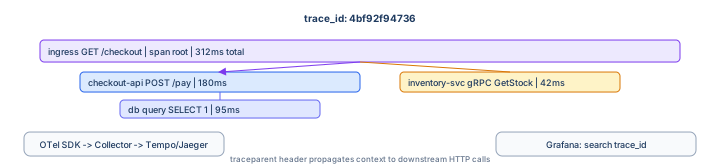
Metrics show that latency jumped; logs show an error message—traces show which hop added 800ms.
This guide instruments HTTP services with OpenTelemetry, propagates W3C trace context,
exports via OTLP to Tempo or Jaeger, and ties trace_id to your
centralized logs.
Prerequisites: Observability explained and a service reachable over HTTP (local or Kubernetes).
After reading, you should be able to:
- Explain trace, span, parent/child, and
trace_id. - Auto-instrument Node or Python with OpenTelemetry.
- Run an OTel Collector and view traces in Grafana.
- Propagate context on outbound HTTP calls.
- Configure head sampling and K8s export paths.
Step 1 — Vocabulary
| Term | Meaning |
|---|---|
| Trace | End-to-end story of one request (many spans) |
| Span | One operation with start time, duration, attributes, status |
| Parent span | Caller’s span—child spans nest under it |
| trace_id | 128-bit ID shared across services (hex string) |
| span_id | ID of this specific operation |
| Context propagation | Passing trace_id on the wire (traceparent header) |
Step 2 — W3C Trace Context (HTTP)
traceparent: 00-4bf92f3577b34da6a3ce929d0e0e4736-00f067aa0ba902b7-01
# version-trace_id-parent_span_id-flags
Ingress creates or continues the trace; each service extracts incoming headers and injects them on outbound calls. Broken propagation = disjoint traces (the most common production bug).
Step 3 — Instrument with OpenTelemetry
npm install @opentelemetry/sdk-node \
  @opentelemetry/auto-instrumentations-node \
  @opentelemetry/exporter-trace-otlp-http
// tracing.js — load BEFORE other imports (node -r ./tracing.js app.js)
const { NodeSDK } = require("@opentelemetry/sdk-node");
const { getNodeAutoInstrumentations } = require("@opentelemetry/auto-instrumentations-node");
const { OTLPTraceExporter } = require("@opentelemetry/exporter-trace-otlp-http");
const sdk = new NodeSDK({
traceExporter: new OTLPTraceExporter({
url: process.env.OTEL_EXPORTER_OTLP_ENDPOINT || "http://localhost:4318/v1/traces",
}),
instrumentations: [getNodeAutoInstrumentations()],
serviceName: process.env.OTEL_SERVICE_NAME || "checkout-api",
});
sdk.start();OTEL_SERVICE_NAME=checkout-api \
OTEL_EXPORTER_OTLP_ENDPOINT=http://localhost:4318/v1/traces \
node -r ./tracing.js app.jspip install opentelemetry-distro opentelemetry-exporter-otlp \
opentelemetry-instrumentation-flask opentelemetry-instrumentation-requestsexport OTEL_SERVICE_NAME=checkout-api
export OTEL_EXPORTER_OTLP_ENDPOINT=http://localhost:4318/v1/traces
opentelemetry-instrument python app.pyopentelemetry-instrument wraps Flask, requests, and other libraries automatically—same idea as Node auto-instrumentation.
Step 4 — Manual span (business logic)
const { trace } = require("@opentelemetry/api");

async function capturePayment(orderId) {
  const tracer = trace.getTracer("checkout-api");
  return tracer.startActiveSpan("capturePayment", async (span) => {
    try {
      span.setAttribute("order_id", orderId);
      await chargeCard(orderId);
      span.setStatus({ code: 1 }); // OK
    } catch (err) {
      span.recordException(err);
      span.setStatus({ code: 2, message: err.message });
      throw err;
    } finally {
      span.end();
    }
  });
}
Use manual spans for domain steps auto-instrumentation misses (pricing rules, fraud checks).
Step 5 — Propagate on outbound HTTP
Auto-instrumentation handles fetch/http/requests when context is active. For custom clients, inject headers from context:
const { propagation, context } = require("@opentelemetry/api");

const headers = {};
propagation.inject(context.active(), headers);
await fetch("http://inventory-svc/stock", { headers });
Async message queues need propagation on message attributes (SQS, Kafka headers)—same trace_id, different carrier.
Step 6 — OTel Collector + Tempo (local)
docker-compose.tracing.yml
services:
  otel-collector:
    image: otel/opentelemetry-collector-contrib:0.96.0
    command: ["--config=/etc/otel-collector.yaml"]
    volumes:
      - ./otel-collector.yaml:/etc/otel-collector.yaml
    ports:
      - "4317:4317"   # OTLP gRPC
      - "4318:4318"   # OTLP HTTP

  tempo:
    image: grafana/tempo:2.4.1
    command: ["-config.file=/etc/tempo.yaml"]
    volumes:
      - ./tempo.yaml:/etc/tempo.yaml
    ports:
      - "3200:3200"

  grafana:
    image: grafana/grafana:10.4.2
    ports: ["3000:3000"]
otel-collector.yaml
receivers:
  otlp:
    protocols:
      http:
        endpoint: 0.0.0.0:4318
      grpc:
        endpoint: 0.0.0.0:4317

exporters:
  otlp:
    endpoint: tempo:4317
    tls:
      insecure: true

service:
  pipelines:
    traces:
      receivers: [otlp]
      exporters: [otlp]
docker compose -f docker-compose.tracing.yml up -d
# Grafana → Connections → Tempo http://tempo:3200
# Explore → TraceQL / Search by trace ID6.1 — Jaeger instead of Tempo
Point the collector exporter to Jaeger’s OTLP endpoint (jaeger:4317) or use Jaeger all-in-one with COLLECTOR_OTLP_ENABLED=true. Grafana can query Jaeger as a data source—team preference, same instrumentation.
Step 7 — Tie traces to logs
Read active trace from OTel and add to structured logs (logs guide):
const span = trace.getSpan(context.active());
const sc = span?.spanContext();
if (sc?.traceId) {
  log.info({ trace_id: sc.traceId, span_id: sc.spanId }, "payment captured");
}
In Grafana, use “Logs for this trace” when Tempo and Loki data sources are linked (trace_id derived field).
Step 8 — Kubernetes deployment
env:
  - name: OTEL_SERVICE_NAME
    value: checkout-api
  - name: OTEL_EXPORTER_OTLP_ENDPOINT
    value: http://otel-collector.monitoring.svc.cluster.local:4318
  - name: OTEL_RESOURCE_ATTRIBUTES
    value: deployment.environment=prod,k8s.pod.name=$(POD_NAME)
  - name: POD_NAME
    valueFrom:
      fieldRef:
        fieldPath: metadata.name
Patterns:
- Sidecar collector — pod exports to localhost sidecar → central Tempo.
- DaemonSet collector — one collector per node (common at scale).
- OpenTelemetry Operator —
InstrumentationCRD injects SDK env vars into pods.
helm install tempo grafana/tempo -n monitoring
helm install otel open-telemetry/opentelemetry-collector -n monitoring \
  -f collector-values.yaml
Step 9 — Sampling (control cost)
Tracing every request in high QPS systems is expensive. Head sampling decides at trace start:
# collector probabilistic sampler
processors:
  probabilistic_sampler:
    sampling_percentage: 10

service:
  pipelines:
    traces:
      processors: [probabilistic_sampler, batch]
      receivers: [otlp]
      exporters: [otlp]
Always sample errors in app code if your SDK supports tail sampling—or keep 100% in staging, 5–10% in prod. Incidents use logs + metrics when trace is missing.
Step 10 — Debug a slow request (workflow)
- Grafana Explore → Tempo → search by duration > 2s and service name.
- Open waterfall—find widest span (DB? external API?).
- Copy
trace_id→ Loki:{app="checkout-api"} | json | trace_id="...". - Check Prometheus histogram for that route at the same timestamp.
Step 11 — Troubleshooting
| Symptom | Fix |
|---|---|
| Traces only in one service | Broken traceparent propagation on outbound calls |
| No traces at all | Wrong OTLP URL; collector not running; firewall on 4317/4318 |
| Duplicate spans | Double instrumentation (agent + manual wrapper) |
| Clock skew in waterfall | NTP on nodes; spans still usable for relative width |
| Missing async work | Context not passed to setImmediate / worker threads / Celery tasks |
Step 12 — Anti-patterns
- Custom trace headers per team instead of W3C standards.
- 100% sampling in prod without storage plan.
- Span attributes with unbounded values (SQL with literal IDs on every query text).
- Tracing only the edge service—internal monolith calls invisible.
Interview phrase: “We standardize on OpenTelemetry, propagate W3C traceparent on HTTP and queues, export OTLP to Tempo via a collector, log trace_id in JSON, and sample ~10% in prod—incident triage goes metric alert → trace waterfall → correlated logs.”
The one line to remember
One trace_id, many spans, propagated on every hop—OpenTelemetry instruments once, the collector routes, Grafana shows where time went.