
SLOs, alerting & on-call
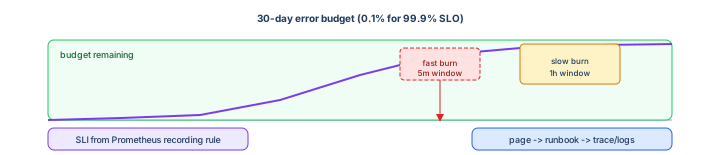
Dashboards without SLOs are decoration; alerts without runbooks are noise. This guide turns Prometheus metrics into an SLI, protects it with a 99.9% SLO, pages on burn-rate symptoms, and connects remaining error budget to deploy gates—so on-call wakes up for customers, not CPU graphs.
Prerequisites: Observability explained (SLO vocabulary) and RED metrics exporting from your API.
After reading, you should be able to:
- Define an availability SLI as a Prometheus recording rule.
- Configure multi-window burn-rate alert rules.
- Route pages vs tickets in Alertmanager.
- Write a one-page runbook linked from every alert.
- Describe when to freeze releases based on error budget.
Step 1 — Pick one SLI to start
For an HTTP API, a practical availability SLI:
Proportion of valid requests that succeed (non-5xx) and complete under 500ms.
Write the SLI in PromQL first—if you cannot query it, you cannot SLO it.
Step 2 — Recording rules (SLI + error ratio)
Extend rules from the metrics guide:
# rules/slo-checkout.yaml
groups:
  - name: slo_checkout
    interval: 30s
    rules:
      - record: sli:checkout:requests_total:rate5m
        expr: sum(rate(http_requests_total{service="checkout-api"}[5m]))

      - record: sli:checkout:errors_total:rate5m
        expr: sum(rate(http_requests_total{service="checkout-api",status=~"5.."}[5m]))

      - record: sli:checkout:availability:ratio5m
        expr: |
          (
            sli:checkout:requests_total:rate5m
            - sli:checkout:errors_total:rate5m
          )
          / sli:checkout:requests_total:rate5m

      - record: sli:checkout:error_budget:remaining30d
        expr: |
          1 - (
            (1 - avg_over_time(sli:checkout:availability:ratio5m[30d]))
            / (1 - 0.999)
          )
0.999 is the SLO target (99.9% over 30 days). Adjust window and target per product—document them in a service README.
Step 3 — Error budget policy (human agreement)
| Budget remaining | Engineering action |
|---|---|
| > 50% | Normal feature velocity |
| 25–50% | Extra caution; canary required; fewer risky changes |
| < 25% | Freeze non-critical releases; reliability work prioritized |
| Exhausted (SLO breach) | Postmortem; no major launches until recovery plan executed |
Share this table with product—SLOs are a negotiation tool, not only ops trivia.
Step 4 — Burn-rate alerts (symptom-based)
Google SRE multi-window approach: page when budget burns too fast in a short window, ticket when it smolders in a long window.
# rules/alerts-slo-checkout.yaml
groups:
  - name: slo_burn_checkout
    rules:
      # Fast burn — ~2% budget in 1h → page (example factors for 99.9% / 30d)
      - alert: CheckoutSLOFastBurn
        expr: |
          (
            sli:checkout:errors_total:rate5m
            / sli:checkout:requests_total:rate5m
          ) > (14.4 * 0.001)
        for: 2m
        labels:
          severity: page
          service: checkout-api
        annotations:
          summary: "Checkout SLO burning fast (5m error rate)"
          runbook: "https://wiki.example/runbooks/checkout-slo"
          dashboard: "https://grafana.example/d/checkout-red"

      # Slow burn — ~5% budget in 6h → ticket
      - alert: CheckoutSLOSlowBurn
        expr: |
          (
            sli:checkout:errors_total:rate5m
            / sli:checkout:requests_total:rate5m
          ) > (6 * 0.001)
        for: 15m
        labels:
          severity: ticket
          service: checkout-api
        annotations:
          summary: "Checkout SLO elevated error rate (sustained)"
          runbook: "https://wiki.example/runbooks/checkout-slo"
Factors (14.4, 6) depend on SLO window and target—use an SLO calculator or Sloth/Alertmanager SLO generators in production; the pattern matters more than memorizing constants.
Step 5 — Alertmanager routing
# alertmanager.yml (simplified)
route:
  receiver: slack-info
  routes:
    - matchers:
        - severity="page"
      receiver: pagerduty-primary
      continue: true
    - matchers:
        - severity="ticket"
      receiver: slack-oncall

receivers:
  - name: pagerduty-primary
    pagerduty_configs:
      - routing_key: ${PAGERDUTY_KEY}
  - name: slack-oncall
    slack_configs:
      - channel: "#oncall"
  - name: slack-info
    slack_configs:
      - channel: "#eng-alerts"
Every page alert includes runbook and dashboard annotations—on-call should never grep Slack for “what do I do?”
Step 6 — Runbook template (one page)
# Runbook: Checkout SLO burn

## Impact
Customers cannot complete checkout; revenue at risk.

## First 5 minutes
1. Open Grafana RED dashboard (link in alert).
2. Check recent deploys — GitHub Actions / Argo CD last 2h.
3. Loki: `{app="checkout-api"} | json | level="error"` last 15m.
4. Tempo: slow traces > 2s for service checkout-api.

## Mitigations
- Roll back deployment: `kubectl rollout undo deploy/checkout-api -n prod`
- Scale: `kubectl scale deploy/checkout-api -n prod --replicas=8`

## Escalation
- #checkout-oncall Slack → payments platform lead if > 30m

## Post-incident
- Postmortem if budget burn > 10%; file ticket for missing test.
Step 7 — On-call expectations
- Primary acknowledges pages within 5 minutes; investigates using runbook.
- Secondary backs up if primary does not ack in 10 minutes.
- Business hours —
severity=ticketto Slack only; no wake-up. - Handoff — log open incidents in status doc at shift change.
Rotation tools: PagerDuty, Opsgenie, Grafana OnCall—process is the same everywhere.
Step 8 — Tie SLO to CI/CD gates
After deploy to staging, automated checks before prod (environment gates):
- Smoke test HTTP 200 on
/health. - Query Prometheus:
sli:checkout:availability:ratio5m > 0.995for 10 minutes (canary period). - Block prod GitHub Environment approval if error budget recording rule < 25% remaining.
# GitHub Actions snippet (conceptual)
- name: Check error budget
  run: |
    BUDGET=$(curl -sG http://prometheus/api/v1/query \
      --data-urlencode 'query=sli:checkout:error_budget:remaining30d' \
      | jq '.data.result[0].value[1]')
    awk -v b="$BUDGET" 'BEGIN { exit !(b > 0.25) }'
Step 9 — Incident workflow (metrics → logs → traces)
- Page fires on burn rate—open dashboard from annotation.
- Confirm user impact (support tickets, synthetic check).
- Logs with
trace_idfrom error sample (logs guide). - Trace waterfall for slow/failed path (tracing guide).
- Mitigate, then postmortem if SLO budget took significant hit.
Step 10 — What not to page on
- Single pod restart with passing readiness.
- CPU > 70% with stable latency and error rate.
- Certificate expiry < 30 days (ticket reminder instead).
- Any alert without owner team label.
Step 11 — Troubleshooting alerting
| Symptom | Fix |
|---|---|
| Alert never fires | Rule not loaded; for: too long; PromQL divides by zero |
| Flapping page | Increase for:; fix underlying deploy; tune burn factor |
| Page storm | group_by in Alertmanager; inhibit rules (node down inhibits pod alerts) |
| SLO always green but users angry | Wrong SLI—measure success path, not /health only |
Step 12 — Anti-patterns
- 100+ alerts per service with no severity model.
- SLO target 100%—impossible error budget, teams ignore it.
- Runbooks that only say “check Grafana.”
- Paging on infrastructure cause; not user symptom.
- Skipping postmortem when budget is burned—repeat incident next month.
Interview phrase: “We define an availability SLI in Prometheus, set a 99.9% thirty-day SLO, page on multi-window burn rates with runbook links, route through Alertmanager to PagerDuty, and slow feature work when error budget drops below twenty-five percent.”
The one line to remember
SLOs turn metrics into policy—burn-rate alerts wake the right person, runbooks tell them what to do, error budget tells product when to stop shipping.
Observability track — complete
Full path: Explained → Metrics → Logs → Tracing → this guide. The DevOps hub tracks are now complete from Docker through observability.