
Metrics & Prometheus
Observability explained introduced metrics—here you implement them with
Prometheus: expose a /metrics endpoint, configure scrapes, write PromQL for
RED (rate, errors, duration), add recording rules, and build Grafana dashboards that on-call actually opens.
Prerequisites: a service you can run locally (or in Kubernetes) and basic HTTP familiarity.
After reading, you should be able to:
- Instrument an HTTP API with counters and histograms.
- Configure Prometheus static and Kubernetes service discovery scrapes.
- Write PromQL for request rate, error ratio, and latency percentiles.
- Add recording rules and a symptom-based alert.
- Sketch a minimal RED Grafana dashboard.
Step 1 — Naming metrics (RED-friendly)
| RED | Metric type | Name example |
|---|---|---|
| Rate | Counter | http_requests_total |
| Errors | Counter (label status) | same series, filter status=~"5.." |
| Duration | Histogram | http_request_duration_seconds |
Use labels sparingly: method, route (template path like /users/:id), status—not raw URLs with IDs.
Step 2 — Instrument the app
npm install prom-client expressconst express = require("express");
const client = require("prom-client");
const register = new client.Registry();
client.collectDefaultMetrics({ register });
const httpRequests = new client.Counter({
name: "http_requests_total",
help: "Total HTTP requests",
labelNames: ["method", "route", "status"],
registers: [register],
});
const httpDuration = new client.Histogram({
name: "http_request_duration_seconds",
help: "HTTP latency",
labelNames: ["method", "route", "status"],
buckets: [0.005, 0.01, 0.05, 0.1, 0.5, 1, 2],
registers: [register],
});
const app = express();
app.use((req, res, next) => {
const end = httpDuration.startTimer({ method: req.method, route: req.path });
res.on("finish", () => {
const labels = { method: req.method, route: req.path, status: String(res.statusCode) };
httpRequests.inc(labels);
end(labels);
});
next();
});
app.get("/health", (_, res) => res.json({ ok: true }));
app.get("/metrics", async (_, res) => {
res.set("Content-Type", register.contentType);
res.end(await register.metrics());
});
app.listen(8080, () => console.log("listening :8080"));pip install prometheus-client flaskfrom flask import Flask, request
from prometheus_client import Counter, Histogram, generate_latest, CONTENT_TYPE_LATEST
app = Flask(__name__)
REQUESTS = Counter(
"http_requests_total",
"HTTP requests",
["method", "route", "status"],
)
DURATION = Histogram(
"http_request_duration_seconds",
"HTTP latency",
["method", "route", "status"],
buckets=(0.005, 0.01, 0.05, 0.1, 0.5, 1, 2),
)
@app.before_request
def _start():
request._start = DURATION.labels(
method=request.method, route=request.path, status="200"
).time()
@app.after_request
def _observe(resp):
REQUESTS.labels(
method=request.method, route=request.path, status=str(resp.status_code)
).inc()
return resp
@app.get("/metrics")
def metrics():
return generate_latest(), 200, {"Content-Type": CONTENT_TYPE_LATEST}
app.run(host="0.0.0.0", port=8080)curl -s localhost:8080/metrics | head
# HELP http_requests_total Total HTTP requests
# TYPE http_requests_total counterStep 3 — Local Prometheus (Docker)
prometheus.yml
global:
  scrape_interval: 15s
  evaluation_interval: 15s

scrape_configs:
  - job_name: api
    static_configs:
      - targets: ["host.docker.internal:8080"]   # Mac/Win; Linux: host IP
docker run -d --name prometheus -p 9090:9090 \
-v $(pwd)/prometheus.yml:/etc/prometheus/prometheus.yml \
prom/prometheus:v2.51.0
open http://localhost:9090/targets # State should be UPStep 4 — Scrape on Kubernetes
Pod annotations (works with prometheus.io/* convention many operators use):
metadata:
  annotations:
    prometheus.io/scrape: "true"
    prometheus.io/port: "8080"
    prometheus.io/path: "/metrics"
Or a ServiceMonitor (Prometheus Operator):
apiVersion: monitoring.coreos.com/v1
kind: ServiceMonitor
metadata:
  name: api
  labels:
    release: kube-prometheus-stack
spec:
  selector:
    matchLabels:
      app: api
  endpoints:
    - port: http
      path: /metrics
      interval: 15s
Step 5 — PromQL for RED
Open Prometheus → Graph and try these (adjust label names to match your app):
# Request rate (per second, 5m window)
sum(rate(http_requests_total[5m])) by (route)

# Error ratio (5xx / all)
sum(rate(http_requests_total{status=~"5.."}[5m]))
/
sum(rate(http_requests_total[5m]))

# p95 latency
histogram_quantile(0.95,
  sum(rate(http_request_duration_seconds_bucket[5m])) by (le, route)
)
Histograms: Always use _bucket + histogram_quantile for percentiles—never average buckets by hand.
Step 6 — Recording rules (precompute expensive queries)
rules/api-red.yml
groups:
  - name: api_red
    interval: 30s
    rules:
      - record: job:http_requests:rate5m
        expr: sum(rate(http_requests_total[5m])) by (route)
      - record: job:http_errors:ratio5m
        expr: |
          sum(rate(http_requests_total{status=~"5.."}[5m]))
          /
          sum(rate(http_requests_total[5m]))
      - record: job:http_latency:p95_5m
        expr: |
          histogram_quantile(0.95,
            sum(rate(http_request_duration_seconds_bucket[5m])) by (le, route)
          )
Mount rules in prometheus.yml:
rule_files:
  - /etc/prometheus/rules/*.yml
Grafana panels can query job:http_latency:p95_5m—faster dashboards, consistent alert math.
Step 7 — Alert rule (symptom, not CPU)
groups:
  - name: api_alerts
    rules:
      - alert: HighErrorRate
        expr: job:http_errors:ratio5m > 0.05
        for: 5m
        labels:
          severity: page
        annotations:
          summary: "API 5xx ratio above 5% for 5m"
          runbook: "https://wiki.example/runbooks/api-5xx"
Route via Alertmanager to Slack/PagerDuty—tune threshold from SLO error budget in the SLOs & on-call guide.
Step 8 — Grafana RED dashboard (panels)
Add Prometheus data source → create dashboard with three rows:
| Panel | Query | Visualization |
|---|---|---|
| Traffic | sum(rate(http_requests_total[5m])) | Time series |
| Errors | job:http_errors:ratio5m | Stat or gauge % |
| Latency p95 | job:http_latency:p95_5m | Time series per route |
Template variable route from label values—filter all panels. Link dashboard URL in alert annotations.
Step 9 — kube-prometheus-stack (cluster-wide)
helm repo add prometheus-community https://prometheus-community.github.io/helm-charts
helm install monitoring prometheus-community/kube-prometheus-stack \
  -n monitoring --create-namespace
Ships Prometheus, Alertmanager, Grafana, node-exporter, and kube-state-metrics—add your ServiceMonitor to the same namespace selector the chart expects (release: monitoring label varies by install).
Step 10 — Troubleshooting
| Symptom | Fix |
|---|---|
| Target DOWN | Network policy, wrong port, app not on 0.0.0.0 |
connection refused from Docker | Use host.docker.internal or host network on Linux |
| Empty graphs | Generate traffic; check time range; verify metric names in /metrics |
histogram_quantile NaN | No buckets scraped yet; increase traffic or wait 5m |
| Cardinality explosion | Stop labeling with user IDs; use bounded route templates |
Step 11 — Anti-patterns
- High-cardinality labels on counters (email, session id).
- Alerting on
up == 0without excluding planned deploys (use burn-rate SLO alerts later). - Duplicating metric names per environment in the name instead of a
envlabel. - Grafana dashboards nobody owns—stale queries after renames.
Interview phrase: “We expose Prometheus histograms for latency, counters for RED, scrape with ServiceMonitors in K8s, precompute p95 with recording rules, and page on error-ratio alerts tied to a dashboard and runbook—not raw CPU.”
The one line to remember
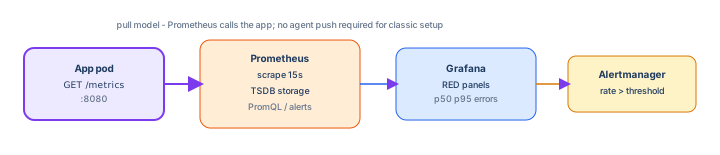
Instrument RED → scrape reliably → PromQL + recording rules → Grafana for humans, Alertmanager for symptoms.