
Networking, IAM & drift
Production platforms need more than a single public subnet: EKS-ready networking, tiered security groups, least-privilege IAM, and a disciplined answer when someone edits the console. This guide extends your VPC module, wires roles for Kubernetes, and shows how to detect and fix drift without panic applies.
Prerequisites: Environments, variables & secrets and remote state from the prior guides.
After reading, you should be able to:
- Tag subnets for public/internal load balancers and run nodes in private subnets with NAT.
- Model security groups as ALB → app → database tiers.
- Attach minimal IAM roles for EKS control plane, nodes, and IRSA workloads.
- Use
import,refresh, and plan-driven workflows to reconcile drift.
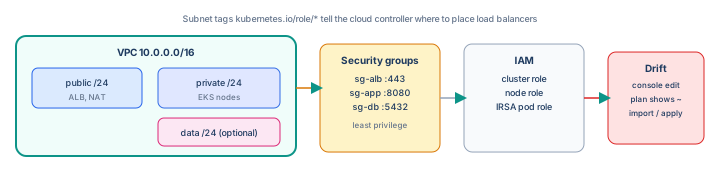
Step 1 — EKS-ready subnet layout
Extend the VPC module with two AZs, public subnets (load balancers + NAT) and private subnets (worker nodes):
resource "aws_subnet" "public" {
  for_each = toset(["a", "b"])
  vpc_id                  = aws_vpc.main.id
  cidr_block              = cidrsubnet(var.vpc_cidr, 8, each.key == "a" ? 1 : 2)
  availability_zone       = data.aws_availability_zones.available.names[each.key == "a" ? 0 : 1]
  map_public_ip_on_launch = true
  tags = merge(var.tags, {
    Name = "${var.name_prefix}-public-${each.key}"
    "kubernetes.io/role/elb" = "1"
  })
}

resource "aws_subnet" "private" {
  for_each = toset(["a", "b"])
  vpc_id            = aws_vpc.main.id
  cidr_block        = cidrsubnet(var.vpc_cidr, 8, each.key == "a" ? 11 : 12)
  availability_zone = data.aws_availability_zones.available.names[each.key == "a" ? 0 : 1]
  tags = merge(var.tags, {
    Name = "${var.name_prefix}-private-${each.key}"
    "kubernetes.io/role/internal-elb" = "1"
  })
}

resource "aws_eip" "nat" {
  count  = var.enable_nat ? 1 : 0
  domain = "vpc"
}

resource "aws_nat_gateway" "main" {
  count         = var.enable_nat ? 1 : 0
  allocation_id = aws_eip.nat[0].id
  subnet_id     = values(aws_subnet.public)[0].id
}

resource "aws_route_table" "private" {
  count  = var.enable_nat ? 1 : 0
  vpc_id = aws_vpc.main.id
  route {
    cidr_block     = "0.0.0.0/0"
    nat_gateway_id = aws_nat_gateway.main[0].id
  }
}
Tag kubernetes.io/cluster/CLUSTER_NAME=shared on subnets when using a specific cluster name—check current EKS docs for your cluster version.
Step 2 — Security groups (three tiers)
| SG | Inbound | Outbound |
|---|---|---|
| sg-alb | 443 from 0.0.0.0/0 (or corporate CIDR) | to sg-app on app port |
| sg-app | app port from sg-alb | to sg-db on 5432 |
| sg-db | 5432 from sg-app only | minimal (often none) |
resource "aws_security_group" "app" {
  name_prefix = "${var.name_prefix}-app-"
  vpc_id      = aws_vpc.main.id

  ingress {
    description     = "From ALB"
    from_port       = 8080
    to_port         = 8080
    protocol        = "tcp"
    security_groups = [aws_security_group.alb.id]
  }

  egress {
    from_port       = 5432
    to_port         = 5432
    protocol        = "tcp"
    security_groups = [aws_security_group.db.id]
  }
}
Avoid 0.0.0.0/0 on app or database tiers. For EKS, node security groups often allow control plane ↔ node traffic per AWS documentation—do not copy generic “allow all” examples into prod.
Step 3 — IAM: cluster, nodes, workloads
resource "aws_iam_role" "eks_cluster" {
  name = "${var.name_prefix}-eks-cluster"
  assume_role_policy = jsonencode({
    Version = "2012-10-17"
    Statement = [{
      Effect = "Allow"
      Principal = { Service = "eks.amazonaws.com" }
      Action = "sts:AssumeRole"
    }]
  })
}

resource "aws_iam_role_policy_attachment" "eks_cluster" {
  role       = aws_iam_role.eks_cluster.name
  policy_arn = "arn:aws:iam::aws:policy/AmazonEKSClusterPolicy"
}
resource "aws_iam_role" "eks_nodes" {
name = "${var.name_prefix}-eks-nodes"
assume_role_policy = jsonencode({
Version = "2012-10-17"
Statement = [{
Effect = "Allow"
Principal = { Service = "ec2.amazonaws.com" }
Action = "sts:AssumeRole"
}]
})
}
resource "aws_iam_role_policy_attachment" "eks_nodes" {
for_each = toset([
"arn:aws:iam::aws:policy/AmazonEKSWorkerNodePolicy",
"arn:aws:iam::aws:policy/AmazonEKS_CNI_Policy",
"arn:aws:iam::aws:policy/AmazonEC2ContainerRegistryReadOnly",
])
role = aws_iam_role.eks_nodes.name
policy_arn = each.value
}# Pod assumes a role via OIDC — grant only what the app needs (e.g. S3 read)
resource "aws_iam_role" "app_s3_read" {
name = "${var.name_prefix}-app-s3-read"
assume_role_policy = data.aws_iam_policy_document.irsa.json
}
resource "aws_iam_role_policy" "app_s3_read" {
role = aws_iam_role.app_s3_read.id
policy = jsonencode({
Version = "2012-10-17"
Statement = [{
Effect = "Allow"
Action = ["s3:GetObject"]
Resource = "arn:aws:s3:::my-bucket/*"
}]
})
}Prefer IRSA over mounting instance-wide node credentials for application AWS API calls.
Least privilege checklist: no AdministratorAccess on node roles; scope policies to resource ARNs; use separate roles per microservice; audit with IAM Access Analyzer.
Step 4 — What is drift?
Drift means Terraform state and configuration no longer match real infrastructure—usually because someone changed the AWS console, a support ticket added a rule, or a failed apply left partial resources.
| Signal | Meaning |
|---|---|
plan shows changes you did not code | Reality ≠ code (drift) or provider read changed |
refresh updates state from API | State catches up to reality without applying |
apply would change prod | Either adopt drift into code or revert reality |
Step 5 — Detect drift in CI and locally
terraform plan -var-file=envs/prod.tfvars -detailed-exitcode
# 0 = no changes, 1 = error, 2 = changes present (drift or pending work)
Scheduled workflow (nightly) on prod state:
- name: drift detection
  run: |
    terraform plan -var-file=envs/prod.tfvars -detailed-exitcode -no-color
  continue-on-error: true
# alert if exit code 2 — Slack/PagerDuty
Pair with AWS Config or CloudTrail alerts for resources tagged as Terraform-managed but modified outside pipeline.
Step 6 — Fix strategies (decision tree)
- Console change was wrong — revert in console or
terraform applyto restore coded values. - Console change was right, temporary — encode in Terraform, open PR, apply through CI.
- Resource exists but not in state —
terraform importthen align HCL. - Resource removed in console —
planshows create; apply recreates or remove from code if intentional.
Step 7 — Import existing resources
Example: security group created manually during an incident.
# Write matching resource block first, then:
terraform import aws_security_group.app sg-0abc123def456789

terraform plan -var-file=envs/prod.tfvars
# goal: No changes. Your HCL must match imported attributes.
For complex resources use terraform plan -generate-config-out=generated.tf (Terraform 1.5+) as a starting point, then hand-edit and move into modules.
import {
  to = aws_security_group.app
  id = "sg-0abc123def456789"
}
Import blocks in code (Terraform 1.5+) make adoption reviewable in PRs like any other change.
Step 8 — Refresh without apply
terraform apply -refresh-only -var-file=envs/prod.tfvars
# updates state from AWS; does not change infrastructure
Use when you need state accurate before a refactor—not a substitute for fixing bad code. After refresh, run plan again.
Step 9 — moved blocks (rename without destroy)
moved {
  from = aws_security_group.application
  to   = aws_security_group.app
}
Prevents destroy/recreate when refactoring addresses—always verify plan shows no unexpected -/+ on production databases or NAT gateways.
Step 10 — Incident: emergency console fix
Runbook: During an outage it is acceptable to open a security group rule in the console. Within 24 hours: (1) capture what changed, (2) update Terraform to match or revert, (3) import if needed, (4) apply via CI with review. Undocumented drift becomes the next outage.
Step 11 — Connect to Kubernetes
With network and IAM in place, the Kubernetes networking guide covers Services and Ingress inside the cluster. Terraform provisions the substrate; CI deploys workloads onto it.
Step 12 — Troubleshooting
| Symptom | Action |
|---|---|
| EKS nodes cannot pull images | Check NAT route on private RT; endpoints for ECR |
| LoadBalancer stuck pending | Missing kubernetes.io/role/elb on public subnets |
import succeeds, plan wants replace | HCL attributes differ—align tags, name, vpc_id |
| Drift every plan on same attribute | Provider bug or computed field—use lifecycle { ignore_changes = [...] } sparingly |
| Accidental destroy in plan | Stop—fix moved or state mv; never apply blind |
Step 13 — Anti-patterns
0.0.0.0/0on SSH or database security groups.- Shared mega-role for all pods and nodes.
- Ignoring nightly drift alerts until apply fails Friday night.
lifecycle { prevent_destroy = false }on NAT without change process.- Importing prod resources without a PR review of generated config.
Interview phrase: “We run EKS in private subnets with tagged public subnets for ALBs, tier security groups by reference not CIDR sprawl, IRSA for app AWS access, nightly terraform plan for drift with exit code 2 alerts, and any console break-glass change gets imported or codified in the next PR.”
The one line to remember
Network and IAM are contracts—code them explicitly, detect when reality diverges, and never let console fixes become permanent secrets.
Infrastructure track — complete
You now have the full path: IaC explained → first project → state & modules → environments → this guide. Next on DevOps: Observability explained →