
Infrastructure & IaC explained
Applications need more than containers—they need networks, DNS, databases, IAM roles, and clusters. Infrastructure as Code (IaC) describes that footprint in version-controlled files so every environment is reproducible, reviewable, and aligned with how you already ship apps via DevSec Core and Kubernetes.
Helpful background: basic cloud vocabulary (VPC, subnet, security group) and comfort with git PR reviews.
After reading, you should be able to:
- Contrast click-ops with declarative IaC.
- Explain
plan,apply, and why state exists. - Name core building blocks (provider, resource, variable, output, module).
- See how IaC provisions the platform your deploy pipelines target.
- Avoid classic mistakes (local-only state, secrets in git, unmanaged drift).
Step 1 — What “infrastructure” means on a cloud team
| Layer | Examples | Often owned by |
|---|---|---|
| Foundation | VPC, subnets, routing, NAT, VPN | Platform / infra engineers |
| Compute | EKS/GKE/AKS cluster, node groups, autoscaling | Platform + SRE |
| Data | RDS, S3, Redis, message queues | Infra + app teams |
| Identity | IAM roles, OIDC for CI, service accounts | Security + platform |
| App runtime | Kubernetes Deployments, Helm releases | App teams (GitOps / CI) |
IaC usually owns the top four layers; Kubernetes manifests or Helm often live in adjacent repos but follow the same review-and-apply discipline.
Step 2 — Manual changes vs declarative IaC
Click-ops in a cloud console is fast for experiments and dangerous for production: no diff review, no audit trail tied to git, and “what is actually running?” becomes a mystery after staff turnover.
Declarative IaC says: “Here is the desired end state.” The tool figures out create/update/delete steps.
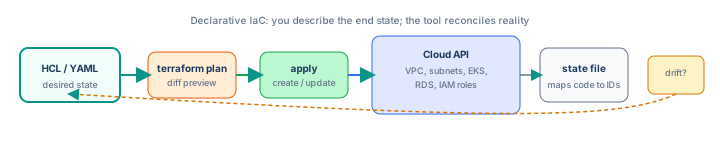
For beginners: Think of IaC like a recipe checked into git—anyone can reproduce the same cake (VPC + cluster) in staging and prod with different ingredient sizes (variables).
For experienced readers: Declarative reconciliation differs from imperative scripts (AWS CLI loops); tools compute dependency graphs and parallelize safe creates.
Step 3 — Terraform vocabulary (used throughout this track)
We use Terraform syntax in examples; OpenTofu is an open-source fork with compatible workflows. Pulumi and CDK use real programming languages but share the same ideas (desired state, diff, deploy).
| Concept | Role |
|---|---|
| Provider | Plugin that talks to AWS, Azure, GCP, GitHub, etc. |
| Resource | One infrastructure object (aws_vpc, aws_eks_cluster) |
| Data source | Read-only lookup (existing VPC ID, AMI ID) |
| Variable | Input per environment (CIDR, instance size) |
| Output | Values for other stacks or humans (cluster endpoint) |
| Module | Reusable package of resources (vpc module, eks module) |
Step 4 — Minimal configuration example
# versions.tf
terraform {
  required_version = ">= 1.6.0"
  required_providers {
    aws = {
      source  = "hashicorp/aws"
      version = "~> 5.0"
    }
  }
}

# variables.tf
variable "environment" {
  type        = string
  description = "staging or production"
}

# main.tf
resource "aws_s3_bucket" "logs" {
  bucket = "myapp-${var.environment}-logs"
  tags = {
    Environment = var.environment
    ManagedBy   = "terraform"
  }
}

# outputs.tf
output "logs_bucket_name" {
  value = aws_s3_bucket.logs.id
}
Step 5 — plan and apply (the daily loop)
terraform init      # download providers, configure backend
terraform fmt -check  # style in CI
terraform validate    # static checks
terraform plan -var="environment=staging"
# review: + create, ~ update, - destroy
terraform apply -var="environment=staging"
plan is your PR review artifact—paste output in the ticket or attach as CI comment. Never apply unreviewed changes to production.
+create something new~update in place (may replace if forces new)-destroy (watch for data loss)-/+destroy then create (new physical ID)
# PR job - plan only, no apply
- run: terraform init -backend=false
- run: terraform plan -input=false -out=tfplan
- uses: actions/upload-artifact@v4
  with:
    name: tfplan
    path: tfplan
Apply runs on merge to main with remote state and OIDC credentials.
Step 6 — State: the tool’s memory
Terraform stores a mapping from resource address in code to real cloud ID (e.g. aws_s3_bucket.logs → myapp-staging-logs). That JSON is the state file.
- Local state (
terraform.tfstate) — OK for solo learning; never for teams. - Remote state — S3 + DynamoDB lock, Terraform Cloud, GCS bucket; required for collaboration.
- Locking — prevents two applies at once corrupting state.
State can contain sensitive values—treat remote buckets as confidential, enable encryption and least-privilege IAM.
Step 7 — Drift: when reality diverges
Drift happens when someone changes resources in the console or an outage replaces hardware. The next plan shows unexpected diffs.
terraform plan   # shows drift vs code
# fix options:
# 1) Update code to match intentional console change
# 2) apply to revert cloud to code
# 3) terraform import for resources adopted into management
Step 8 — How IaC connects to the rest of DevOps
- IaC creates VPC + EKS + RDS + IAM for GitHub OIDC.
- CI/CD builds images and deploys to that cluster (CI/CD track).
- Kubernetes runs workloads; platform may install ingress, metrics-server via Helm or add-ons module.
- Observability (next track) scrapes metrics and ships logs from those resources.
Splitting repos is common: infra-live for Terraform, app-api for service code, app-deploy for manifests—linked by outputs (cluster name, subnet IDs).
Step 9 — Environments without copy-paste
Same modules, different variables:
infra/
  modules/
    vpc/
    eks/
  environments/
    staging/
      main.tf      # module "vpc" { cidr = "10.1.0.0/16" ... }
    production/
      main.tf      # module "vpc" { cidr = "10.2.0.0/16" ... }
Each environment has its own remote state key (staging/terraform.tfstate) so blast radius stays isolated.
Step 10 — Anti-patterns
| Anti-pattern | Why it hurts |
|---|---|
| State file in git | Merge conflicts, leaked secrets, no locking |
terraform.tfvars with secrets committed | Credentials in history—use vault or CI secrets |
| One giant root module | Slow plans, scary blast radius—use modules |
| Apply from laptops to prod | No audit trail—CI with approval gates only |
Ignoring - destroys in plan | Accidental data loss on databases and buckets |
Step 11 — What to learn next on this track
- Terraform: first project — init, VPC, S3 bucket, first apply and destroy in a sandbox account.
- State, modules & remote backends — S3 state, DynamoDB locks, VPC modules, stack split by blast radius.
- Environments, variables & secrets — tfvars per env, CI plan on PR, GitHub Environment gates, Secrets Manager.
- Networking, IAM & drift — EKS subnets, security groups, IRSA, import, refresh, and drift detection.
Interview phrase: “We treat infrastructure as declarative code in git; terraform plan is the PR review surface; remote state with locking is the source of truth for IDs; CI applies to staging automatically and production after approval—drift is detected on every plan.”
The one line to remember
IaC is version-controlled desired state for your cloud—plan before you touch prod, store state where the team can collaborate, and let CI apply what reviewers approved.