
Environments, variables & secrets
The same Terraform code should run in sandbox, staging, and production—with different CIDRs, instance sizes, and state keys. This guide covers tfvars per environment, where secrets actually live, and a GitHub Actions flow that plans on every PR and applies prod only after approval—mirroring CI/CD environment gates.
Prerequisites: State, modules & remote backends (S3 backend and lock table exist).
After reading, you should be able to:
- Structure repo layout for sandbox / staging / prod without duplicating modules.
- Pass
-var-filesafely and never commit real secrets. - Wire CI to
terraform planon PR and gatedapplyto production. - Load runtime secrets from AWS SSM or Secrets Manager instead of tfvars.
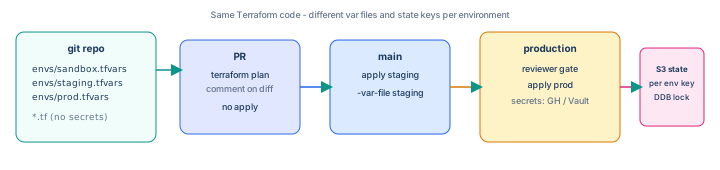
Step 1 — Variable precedence (know the order)
Terraform merges values from many sources (later wins for overlapping assignments in practice—defaults are lowest):
- Variable
defaultinvariables.tf *.tfvars/-var-fileTF_VAR_nameenvironment variables-var 'name=value'on CLI (CI often uses this for secrets)
Keep non-secret differences in committed tfvars; inject secrets from CI or a vault at apply time.
Step 2 — Repo layout (directories beat workspaces for prod)
infra-network/
  backend.tf          # key uses var.environment
  versions.tf
  variables.tf
  main.tf
  modules/vpc/
  envs/
    sandbox.tfvars
    staging.tfvars
    prod.tfvars
    sandbox.backend.hcl   # optional partial backend config
.github/workflows/terraform.yml| Approach | Pros | Cons |
|---|---|---|
| Directories + tfvars | Clear blast radius, distinct backend keys, easy CI matrix | Some duplication in backend config |
Workspaces (terraform workspace) | One folder, quick demos | Easy to apply wrong workspace; shared backend key mistakes hurt prod |
For teams, prefer separate state keys per environment (from the previous guide) plus explicit -var-file.
Step 3 — Shared variables.tf
variable "environment" {
  type = string
  validation {
    condition     = contains(["sandbox", "staging", "prod"], var.environment)
    error_message = "environment must be sandbox, staging, or prod."
  }
}

variable "project" {
  type    = string
  default = "sharpbyte"
}

variable "vpc_cidr" {
  type = string
}

variable "enable_nat" {
  type    = bool
  default = false
}

variable "db_password" {
  type      = string
  sensitive = true
}
Step 4 — tfvars per environment (committed, no secrets)
envs/sandbox.tfvars
environment = "sandbox"
vpc_cidr    = "10.10.0.0/16"
enable_nat  = false
envs/staging.tfvars
environment = "staging"
vpc_cidr    = "10.20.0.0/16"
enable_nat  = true
envs/prod.tfvars
environment = "prod"
vpc_cidr    = "10.30.0.0/16"
enable_nat  = true
Commit envs/*.tfvars. Add envs/example.tfvars as a template. Keep *.auto.tfvars out of git if local overrides might contain secrets.
Step 5 — Backend key includes environment
# backend.tf — use partial config or -backend-config in CI
terraform {
  backend "s3" {
    bucket         = "tfstate-ACCOUNT_ID-sharpbyte"
    region         = "us-east-1"
    dynamodb_table = "terraform-locks"
    encrypt        = true
    # key set at init: e.g. network/${environment}/terraform.tfstate
  }
}
terraform init \
-backend-config="key=network/sandbox/terraform.tfstate"
terraform plan -var-file=envs/sandbox.tfvars
terraform apply -var-file=envs/sandbox.tfvarsStep 6 — Secrets: what never goes in git
| Secret type | Store in | Terraform access |
|---|---|---|
| DB password, API keys | AWS Secrets Manager / SSM | data source at apply, or app reads at runtime |
| CI AWS credentials | GitHub OIDC → IAM role | No long-lived keys in repo |
| Terraform Cloud token | GitHub secret | CI only |
| One-off bootstrap | Password manager / break-glass | Never in tfvars committed |
# Read secret at apply time (sandbox lab — prefer app runtime fetch in prod apps)
data "aws_secretsmanager_secret_version" "db" {
  secret_id = "sharpbyte/${var.environment}/db"
}

locals {
  db_creds = jsondecode(data.aws_secretsmanager_secret_version.db.secret_string)
}

resource "aws_db_instance" "main" {
  username = local.db_creds.username
  password = local.db_creds.password
  # ...
}
For Kubernetes workloads, External Secrets Operator syncs AWS secrets into cluster Secret objects—Terraform provisions the store; apps consume via K8s.
Step 7 — Sensitive outputs and plan redaction
output "db_endpoint" {
  value = aws_db_instance.main.endpoint
}

output "db_password" {
  value     = local.db_creds.password
  sensitive = true
}
terraform plan hides sensitive values; they still exist in state—encrypt remote state (S3 SSE) and restrict IAM on the state bucket.
Step 8 — Local apply with env vars (optional)
export TF_VAR_db_password="$(aws secretsmanager get-secret-value \
  --secret-id sharpbyte/sandbox/db --query SecretString --output text | jq -r .password)"

terraform apply -var-file=envs/sandbox.tfvars
Prefer CI injecting TF_VAR_* from GitHub Secrets for human-operated sandboxes only.
Step 9 — GitHub Actions: plan on PR, gated apply
Create .github/workflows/terraform-network.yml:
name: terraform-network

on:
  pull_request:
    paths: ['infra-network/**']
  push:
    branches: [main]
    paths: ['infra-network/**']

permissions:
  id-token: write
  contents: read
  pull-requests: write

jobs:
  plan:
    runs-on: ubuntu-latest
    steps:
      - uses: actions/checkout@v4
      - uses: hashicorp/setup-terraform@v3
        with:
          terraform_version: 1.6.6
      - uses: aws-actions/configure-aws-credentials@v4
        with:
          role-to-assume: arn:aws:iam::ACCOUNT:role/github-terraform-plan
          aws-region: us-east-1
      - working-directory: infra-network
        run: |
          terraform init -backend-config="key=network/sandbox/terraform.tfstate"
          terraform plan -var-file=envs/sandbox.tfvars -no-color -out=tfplan
      - uses: actions/upload-artifact@v4
        with:
          name: tfplan
          path: infra-network/tfplan

  apply-staging:
    if: github.ref == 'refs/heads/main' && github.event_name == 'push'
    needs: plan
    runs-on: ubuntu-latest
    environment: staging
    steps:
      - uses: actions/checkout@v4
      - uses: hashicorp/setup-terraform@v3
      - uses: aws-actions/configure-aws-credentials@v4
        with:
          role-to-assume: arn:aws:iam::ACCOUNT:role/github-terraform-apply-staging
          aws-region: us-east-1
      - working-directory: infra-network
        env:
          TF_VAR_db_password: ${{ secrets.TF_DB_PASSWORD_STAGING }}
        run: |
          terraform init -backend-config="key=network/staging/terraform.tfstate"
          terraform apply -var-file=envs/staging.tfvars -auto-approve

  apply-prod:
    if: github.ref == 'refs/heads/main' && github.event_name == 'push'
    needs: apply-staging
    runs-on: ubuntu-latest
    environment: production
    steps:
      - uses: actions/checkout@v4
      - uses: hashicorp/setup-terraform@v3
      - uses: aws-actions/configure-aws-credentials@v4
        with:
          role-to-assume: arn:aws:iam::ACCOUNT:role/github-terraform-apply-prod
          aws-region: us-east-1
      - working-directory: infra-network
        env:
          TF_VAR_db_password: ${{ secrets.TF_DB_PASSWORD_PROD }}
        run: |
          terraform init -backend-config="key=network/prod/terraform.tfstate"
          terraform apply -var-file=envs/prod.tfvars -auto-approve
In GitHub → Settings → Environments, create production with required reviewers and optional wait timer—same pattern as CI/CD environment gates.
9.1 — Plan-only on pull requests
PR jobs should never run apply against prod. Use a read-only IAM role for plan (iam:PassRole denied, no destructive actions on state bucket except read).
Step 10 — IAM roles for CI (OIDC sketch)
# Trust GitHub OIDC — one role per capability (plan vs apply-prod)
data "aws_iam_policy_document" "github_plan" {
  statement {
    actions = ["sts:AssumeRoleWithWebIdentity"]
    principals {
      type        = "Federated"
      identifiers = ["arn:aws:iam::ACCOUNT:oidc-provider/token.actions.githubusercontent.com"]
    }
    condition {
      test     = "StringEquals"
      variable = "token.actions.githubusercontent.com:sub"
      values   = ["repo:ORG/REPO:environment:staging"]
    }
  }
}
Tighten sub to branch and environment. Prod apply role should not be assumable from fork PRs (pull_request_target is dangerous—stick to same-repo PRs).
Step 11 — Policy checks before apply
- OPA / Conftest — deny public S3 ACLs, require encryption.
- terraform plan in PR — human review of
+and-counts. - Cost estimation — Infracost comment on PR (optional).
- Branch protection: required status check “plan” before merge.
Step 12 — Troubleshooting
| Symptom | Fix |
|---|---|
| Applied prod with sandbox tfvars | Wrong -var-file or backend key—use CI matrix env explicitly |
| Secret in plan output | Mark variable sensitive = true; never log TF_VAR_* |
| PR plan differs from local | Different provider lock, backend key, or missing tfvars in CI |
Error: No value for required variable | Pass -var-file or set TF_VAR_ in CI secrets |
| Prod apply without approval | Job missing environment: production or bypassed protection |
Step 13 — Anti-patterns
prod.tfvarscontaining real passwords (history is forever).- One workspace for all envs—easy to
applyto prod by mistake. - Same IAM role for plan and prod apply.
terraform apply -auto-approveon prod without environment gate.- Storing kubeconfig or AWS keys in Terraform state—use OIDC and short-lived creds.
Interview phrase: “We use the same modules for every environment with tfvars for sizing and CIDRs; secrets live in Secrets Manager or CI vault; PRs get a terraform plan from a read-only role; staging applies on merge; production uses a GitHub Environment with reviewers and a separate apply role.”
The one line to remember
Code once, configure per environment with tfvars and state keys—secrets stay out of git and prod apply stays behind a gate.