
State, modules & remote backends
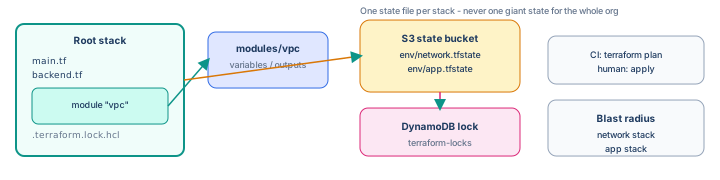
A solo terraform.tfstate on your laptop does not scale. Teams store state in S3 with DynamoDB locking,
reuse infrastructure via modules, and split work into separate stacks so one bad apply cannot take down the whole platform.
Prerequisites: Terraform: first project completed (or equivalent VPC + S3 lab).
After reading, you should be able to:
- Bootstrap and configure an S3 + DynamoDB remote backend.
- Migrate local state safely with
terraform init -migrate-state. - Extract a VPC into a reusable module with clear inputs and outputs.
- Explain why network and application stacks are often separate.
Why remote state matters
| Local state problem | Remote state fix |
|---|---|
| Lost laptop = lost IDs | State object in S3, versioned |
| Two engineers apply at once | DynamoDB lock serializes writes |
| CI cannot apply without your disk | Pipeline uses same backend config |
| No audit trail | S3 versioning + IAM who read/wrote state |
Bootstrap chicken-and-egg: The bucket that holds state cannot be created by the same stack that depends on that bucket. Use a tiny bootstrap stack (or one-time console setup) for the state bucket and lock table, then point all other stacks at it.
Step 1 — Bootstrap backend resources (one-time)
Create ~/tf-bootstrap/main.tf with local state (this stack stays local or in a separate “meta” bucket):
terraform {
  required_version = ">= 1.6.0"
  required_providers {
    aws = { source = "hashicorp/aws", version = "~> 5.0" }
  }
}

provider "aws" {
  region = "us-east-1"
}

data "aws_caller_identity" "current" {}

resource "aws_s3_bucket" "tfstate" {
  bucket = "tfstate-${data.aws_caller_identity.current.account_id}-sharpbyte"
}

resource "aws_s3_bucket_versioning" "tfstate" {
  bucket = aws_s3_bucket.tfstate.id
  versioning_configuration { status = "Enabled" }
}

resource "aws_s3_bucket_server_side_encryption_configuration" "tfstate" {
  bucket = aws_s3_bucket.tfstate.id
  rule {
    apply_server_side_encryption_by_default {
      sse_algorithm = "AES256"
    }
  }
}

resource "aws_s3_bucket_public_access_block" "tfstate" {
  bucket                  = aws_s3_bucket.tfstate.id
  block_public_acls       = true
  block_public_policy     = true
  ignore_public_acls      = true
  restrict_public_buckets = true
}

resource "aws_dynamodb_table" "lock" {
  name         = "terraform-locks"
  billing_mode = "PAY_PER_REQUEST"
  hash_key     = "LockID"

  attribute {
    name = "LockID"
    type = "S"
  }
}

output "state_bucket" {
  value = aws_s3_bucket.tfstate.id
}

output "lock_table" {
  value = aws_dynamodb_table.lock.name
}
cd ~/tf-bootstrap
terraform init && terraform apply
# note outputs: state_bucket, lock_tableStep 2 — Point your lab stack at S3
In ~/tf-sandbox (from the first-project guide), add backend.tf:
terraform {
  backend "s3" {
    bucket         = "tfstate-ACCOUNT_ID-sharpbyte"   # from bootstrap output
    key            = "sandbox/network/terraform.tfstate"
    region         = "us-east-1"
    dynamodb_table = "terraform-locks"
    encrypt        = true
  }
}
The key path is how you separate stacks in one bucket—use distinct keys per stack and environment.
cd ~/tf-sandbox
terraform init -migrate-state
# answer yes to copy local state to S3
Verify: aws s3 ls s3://tfstate-.../sandbox/network/ should show terraform.tfstate. Local terraform.tfstate may remain as backup until you delete it after confirming remote state works.
Step 3 — Locking in practice
While one terminal runs terraform apply, a second terraform plan should block with:
Error acquiring the state lockNever force-unlock unless you are sure no apply is running. Stale locks after a crashed laptop:
terraform force-unlock LOCK_ID # only after verifying no active applyStep 4 — Extract a VPC module
Restructure tf-sandbox:
tf-sandbox/
  backend.tf
  versions.tf
  variables.tf
  main.tf              # calls module
  outputs.tf
  modules/
    vpc/
      main.tf
      variables.tf
      outputs.tf
modules/vpc/variables.tf
variable "name_prefix" {
  type = string
}

variable "vpc_cidr" {
  type    = string
  default = "10.0.0.0/16"
}

variable "public_subnet_cidr" {
  type    = string
  default = "10.0.1.0/24"
}
modules/vpc/main.tf — move VPC, IGW, subnet, and route resources here (same resources as the first-project guide, parameterized with var.name_prefix in tags).
modules/vpc/outputs.tf
output "vpc_id" {
  value = aws_vpc.main.id
}

output "public_subnet_id" {
  value = aws_subnet.public.id
}
Root main.tf
module "vpc" {
  source = "./modules/vpc"

  name_prefix         = "${var.project}-${var.environment}"
  vpc_cidr            = "10.0.0.0/16"
  public_subnet_cidr  = "10.0.1.0/24"
}

# S3 logs bucket can stay at root or move to modules/s3-logs later
output "vpc_id" {
  value = module.vpc.vpc_id
}
terraform init # modules are local paths; no registry download
terraform plan # should show no changes if refactor is equivalent
terraform applyStep 5 — Provider versioning and lock file
Pin providers in versions.tf with ~> 5.0 (minor upgrades allowed). After terraform init, commit .terraform.lock.hcl so CI and teammates resolve the same provider checksums.
terraform providers
terraform init -upgrade   # deliberate bump only
Step 6 — Split stacks by blast radius
One monolithic state file for VPC, RDS, EKS, and IAM means a typo in a security group rule can block a database migration apply. Common split:
| Stack | State key example | Changes often |
|---|---|---|
| network | prod/network/terraform.tfstate | Rarely—VPC, subnets, NAT |
| platform | prod/eks/terraform.tfstate | Cluster upgrades |
| app | prod/app/terraform.tfstate | Deployments, S3, SQS |
Downstream stacks read upstream outputs via terraform_remote_state data source (or pass IDs through CI/CD variables):
# In app stack — reads network stack outputs
data "terraform_remote_state" "network" {
  backend = "s3"
  config = {
    bucket = "tfstate-ACCOUNT_ID-sharpbyte"
    key    = "prod/network/terraform.tfstate"
    region = "us-east-1"
  }
}

resource "aws_instance" "bastion" {
  subnet_id = data.terraform_remote_state.network.outputs.public_subnet_id
  # ...
}
Apply order: network → platform → app. Destroy order is reversed.
Step 7 — Module sources (beyond local paths)
module "vpc" {
  source = "./modules/vpc"
}
module "vpc" {
source = "git::https://github.com/org/terraform-modules.git//vpc?ref=v1.2.0"
}Pin ref to tags or SHAs—never floating main in production.
module "vpc" {
  source  = "terraform-aws-modules/vpc/aws"
  version = "5.1.1"
  # ...
}
Step 8 — State operations you will use
terraform state list
terraform state show module.vpc.aws_vpc.main
terraform state mv aws_vpc.main module.vpc.aws_vpc.main   # after refactor
terraform state rm aws_instance.old                       # removed from code, orphan in state
state mv and state rm are surgical—prefer fixing code so plan shows the intended diff when possible.
Step 9 — Troubleshooting
| Symptom | Action |
|---|---|
Backend configuration changed | terraform init -reconfigure or -migrate-state with care |
AccessDenied on S3 state | IAM policy needs s3:GetObject, PutObject, ListBucket on state bucket |
| Lock never releases | Confirm no running apply; check DynamoDB item; then force-unlock |
| Module produces unexpected destroy | Renamed resource address—use moved blocks (TF 1.1+) or state mv |
| Remote state output missing | Upstream stack not applied; wrong key in data source |
Step 10 — Anti-patterns
- Committing
terraform.tfstateto a public repo (secrets and IDs leak). - One state file for entire org (plan/apply times explode; blast radius is huge).
- Sharing state bucket without versioning or encryption.
- Unpinned module
ref=main—production drifts without review. terraform apply -auto-approveon networking stacks in prod.
Interview phrase: “We bootstrap S3 and DynamoDB once, every stack has its own state key, modules encapsulate VPC patterns with versioned sources, and CI runs plan on every PR—apply to prod is gated and uses the same remote backend the team shares.”
The one line to remember
Remote state + locks let the team collaborate safely; modules stop copy-paste; separate state files keep one mistake from freezing the entire cloud.