
Terraform: first project
Reading about IaC is step one; step two is a small, real
terraform apply in a sandbox AWS account. You will create a VPC with one public subnet, an S3 bucket for logs,
and walk through init, plan, apply, and destroy with local state.
Prerequisites: AWS account (free tier or sandbox), ability to create access keys or SSO profile, and Terraform 1.6+ installed.
After reading, you should be able to:
- Lay out a minimal Terraform repo and
.gitignorecorrectly. - Configure the AWS provider and region.
- Apply a VPC + subnet + S3 bucket and read
planoutput. - Verify resources in the AWS console and tear them down with
destroy.
Cost & safety: Use a dedicated sandbox account or sub-account. Run terraform destroy when finished. This lab creates billable resources (VPC, NAT-free public subnet only, S3).
Step 0 — Install tools
# macOS (Homebrew)
brew install terraform awscli

# Verify
terraform version    # >= 1.6
aws --version
aws sts get-caller-identity   # confirms credentials
Linux: use HashiCorp’s APT/Yum repo for Terraform; install awscli v2 from AWS docs. Windows: winget install Hashicorp.Terraform and AWS CLI v2 MSI.
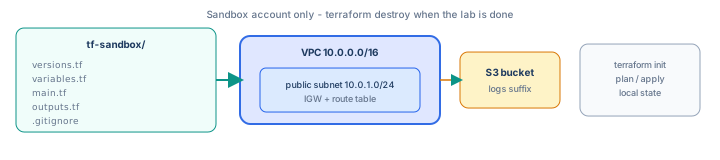
Step 1 — AWS credentials (sandbox only)
aws configure --profile tf-sandbox
# enter access key, secret, region e.g. us-east-1

export AWS_PROFILE=tf-sandbox
export AWS_REGION=us-east-1
export AWS_ACCESS_KEY_ID=AKIA...
export AWS_SECRET_ACCESS_KEY=...
export AWS_DEFAULT_REGION=us-east-1Prefer SSO / IAM Identity Center in real orgs—keys are for sandboxes only.
Attach a policy that allows VPC and S3 management in the sandbox (for learning, PowerUserAccess in a throwaway account is common; tighten in production).
Step 2 — Create the project directory
mkdir -p ~/tf-sandbox && cd ~/tf-sandboxCreate .gitignore before first init:
.terraform/
*.tfstate
*.tfstate.*
.terraform.lock.hcl
crash.log
*.tfvars
!example.tfvars
Step 3 — Provider and variables
versions.tf
terraform {
  required_version = ">= 1.6.0"
  required_providers {
    aws = {
      source  = "hashicorp/aws"
      version = "~> 5.0"
    }
  }
}

provider "aws" {
  region = var.aws_region
}
variables.tf
variable "aws_region" {
  type    = string
  default = "us-east-1"
}

variable "project" {
  type    = string
  default = "sharpbyte-lab"
}

variable "environment" {
  type    = string
  default = "sandbox"
}
Step 4 — VPC and public subnet
main.tf — networking block (EKS-ready shape starts here; cluster comes later):
data "aws_availability_zones" "available" {
  state = "available"
}

resource "aws_vpc" "main" {
  cidr_block           = "10.0.0.0/16"
  enable_dns_hostnames = true
  enable_dns_support   = true
  tags = {
    Name = "${var.project}-${var.environment}-vpc"
  }
}

resource "aws_internet_gateway" "main" {
  vpc_id = aws_vpc.main.id
  tags = {
    Name = "${var.project}-${var.environment}-igw"
  }
}

resource "aws_subnet" "public" {
  vpc_id                  = aws_vpc.main.id
  cidr_block              = "10.0.1.0/24"
  availability_zone       = data.aws_availability_zones.available.names[0]
  map_public_ip_on_launch = true
  tags = {
    Name = "${var.project}-${var.environment}-public-a"
  }
}

resource "aws_route_table" "public" {
  vpc_id = aws_vpc.main.id
  route {
    cidr_block = "0.0.0.0/0"
    gateway_id = aws_internet_gateway.main.id
  }
  tags = {
    Name = "${var.project}-${var.environment}-public-rt"
  }
}

resource "aws_route_table_association" "public" {
  subnet_id      = aws_subnet.public.id
  route_table_id = aws_route_table.public.id
}
4.1 — S3 bucket for application logs
Append to main.tf (globally unique bucket name required):
resource "aws_s3_bucket" "logs" {
  bucket = "${var.project}-${var.environment}-logs-${data.aws_caller_identity.current.account_id}"
  tags = {
    Name        = "${var.project}-logs"
    Environment = var.environment
  }
}

resource "aws_s3_bucket_versioning" "logs" {
  bucket = aws_s3_bucket.logs.id
  versioning_configuration {
    status = "Enabled"
  }
}

resource "aws_s3_bucket_server_side_encryption_configuration" "logs" {
  bucket = aws_s3_bucket.logs.id
  rule {
    apply_server_side_encryption_by_default {
      sse_algorithm = "AES256"
    }
  }
}

data "aws_caller_identity" "current" {}
Move data "aws_caller_identity" "current" to the top of main.tf if you prefer data sources grouped together.
Step 5 — Outputs
# outputs.tf
output "vpc_id" {
  value = aws_vpc.main.id
}

output "public_subnet_id" {
  value = aws_subnet.public.id
}

output "logs_bucket_name" {
  value = aws_s3_bucket.logs.id
}
Step 6 — init, plan, apply
cd ~/tf-sandbox
terraform init
Downloads the AWS provider into .terraform/ and creates .terraform.lock.hcl (commit the lock file; ignore .terraform/).
terraform fmt -recursive
terraform validate
terraform plan
Expect roughly 10+ resources to add (VPC, IGW, subnet, routes, S3, versioning, encryption). Read every + line before continuing.
terraform applyType yes when prompted (or use -auto-approve only in sandboxes). Apply takes one to three minutes.
terraform output
aws s3 ls | grep sharpbyte-lab
aws ec2 describe-vpcs --filters "Name=tag:Name,Values=sharpbyte-lab-sandbox-vpc"
Step 7 — Inspect state (local for now)
ls -la terraform.tfstate
terraform state list
terraform state show aws_vpc.main
The state file maps aws_vpc.main to your real VPC ID. Next guide moves this to S3 with locking—do not commit state to a public repo.
Step 8 — Change and re-plan
Add a tag in aws_vpc.main:
tags = {
  Name    = "${var.project}-${var.environment}-vpc"
  Lab     = "terraform-first-project"
}
terraform plan # should show ~ update in-place only on tagsSmall in-place updates are safe; watch for -/+ which means replace (new physical ID).
Step 9 — Destroy when done
terraform destroyS3 buckets must be empty before destroy if you added objects—either delete objects in the console or add a force-destroy flag only in sandboxes:
resource "aws_s3_bucket" "logs" {
  # ...
  force_destroy = true   # sandbox only
}
Step 10 — Troubleshooting
| Error | Fix |
|---|---|
No valid credential sources | Set AWS_PROFILE or env vars; run aws sts get-caller-identity |
AccessDenied on ec2:CreateVpc | IAM policy missing VPC permissions |
BucketAlreadyExists | S3 names are global—include account ID in bucket name as above |
Error acquiring the state lock | Stale lock from interrupted apply—next guide covers DynamoDB locks |
| Provider version mismatch | Run terraform init -upgrade and commit lock file |
Interview phrase: “I keep Terraform in version control with lock files, run plan in PRs, use variables for environment differences, and never apply networking changes to prod without reviewing destroys—state belongs in remote storage with locking for teams.”
The one line to remember
Your first Terraform project is init → plan → apply → verify → destroy in a sandbox—prove you can read the plan before you trust apply in production.